讲流程之前,首先提醒大家,最好是下载苹果自己出品的ITC MoblieITC Mobile, 方便在移动状态下浏览收益是一方面,提交App以后最及时的获得审核进度
【千锋】iOS开发视频教程学习(1-17集)
iOS开发视频教程-第一季
-
(第一集:iOS历史介绍)
-
(第二集:xcode安装)
-
(第三集:UIView)-边框frame、边界bounds、中心center
-
(第四集:UILabel) UILabel主要属性:NSString *text-文本、UIFont *font-字体、UIColor *textColor-文本颜色、UILineBreakMode lineBreakMode-文本这行的模式、UITextAlignment textAlignment-文本的对齐方式(有左中右) UILabel和字体大小匹配 `- (void)viewDidLoad { [super viewDidLoad]; // Do any additional setup after loading the view, typically from a nib. NSString *s = @“mai.yang是饭特稀娱乐体育的后台开发工程师,android和ios客户端开发工程师”; UIFont *font = [UIFont fontWithName:@“Arial” size:50.0f]; CGSize size = CGSizeMake(320, 300);// 超过指定的高度300后,系统会自动将超长的截断用…表示 UILabel *label2 = [[UILabel alloc] initWithFrame:CGRectZero]; [label2 setNumberOfLines:0];
CGSize labelSize = [s sizeWithFont:font constrainedToSize:size lineBreakMode:NSLineBreakByWordWrapping];
label2.frame = CGRectMake(0, 0, labelSize.width, labelSize.height); label2.textColor = [UIColor blackColor]; label2.font = font; label2.text = s;
[self.view addSubview:label2]; }`
SQL四种语言:DDL,DML,DCL,TCL
1.DDL(Data Definition Language)数据库定义语言statements are used to define the database structure or schema. DDL是SQL语言的四大功能之一。 用于定义数据库
【转】苹果文档导读
前面我们讲Xcode的文档结构是在介绍如何能够快速定位到你要找的内容。但是很多人的问题可能是一开始就根本不知道要读什么。
这里我们就介绍自学iOS开发应该遵循或者说我们推荐的必读文档的阅读顺序。
阅读顺序:
《马上着手开发 iOS 应用程序 (Start Developing iOS Apps Today)》 1.《Your First iOS App》 2.《Your Second iOS App: Storyboards》 3.《Your Third iOS App: iCloud》 4.《iOS Technology Overview》 5.《iOS Human Interface Guidelines》 6.《Learning Objective-C: A Primer》和《Programming with Objective-C》 7.《iOS App Programming Guide》 8.《View Programming Guide for iOS》和《View Controller Programming Guide for iOS》 9.《Table View Programming Guide for iOS》 首先应该看的是Getting Started里面的《马上着手开发 iOS 应用程序 (Start Developing iOS Apps Today)》(中英文版本皆有,苹果官方的翻译)。这个文档讲的很浅,但是是建立概念的文档,你以后在开发里面经常遇到的概念,在这里都有包含,特别注意是,这个文档看起来简单,但是每页下面的相关文章,不是选读,都是必读。
即使是很多做了iOS开发很久的同学,其实也有很多概念上的误解,现代程序开发越来越简单,工具越来越强大,往往有些误解也可以继续前行,但是实际上不建立扎实的基础是很吃亏的,往往后面理解和解决一个不难解决小问题都要付出很多辛苦。
阅读这个文档的目的和检测标准是,以后你看到iOS开发中的基本概念,都大致所有了解。
读完《马上着手开发 iOS 应用程序 (Start Developing iOS Apps Today)》后,应该去看Your XXX iOS App系列这个系列不是什么很难的文章,你也不必着急先去学习Objective-C,学什么C语言就更不要着急。我推荐的学习方法是有成就的逐步学习法。在学习系统体系架构、Objective-C之前,你可以先按照文档写一个全天下最简单的App,完成学习过程中第一个里程碑。在这个过程中不用担心有什么疑问,有什么不懂,先照着做就是。
阅读这三个文档的目的和检测标准是,把这三个Demo App做出来在模拟器上跑起来。
在这个过程中,你对开发工具的基本认识就建立起来了,也有了成就感,去了魅(就是消除了对iOS开发的神秘感)。
再往下,建议你去看《iOS Technology Overview》(iOS技术概览),iOS不是一个技术,而是一堆技术,前一篇讲到文档导航区域的分类,框架分类的时候,我说不细讲的原因就在于此,你要做一个动画应该用Core Animation还是OpenGL?你要做一些文本相关操作应该用Core Text还是什么,就是看这里。
学习现代的程序开发,语言和框架并重。我们Tiny4Cocoa叫做这个名字的原因就是,iOS/Mac开发者的代表往往就是这个Cocoa框架,就是这个SDK。大多数你所需要的功能都躺在框架里面,你知道框架的结构,你才知道怎么去寻找相关的技术资料。
饭特稀体育产品思考
#网站改造想法 ###一、网站赢利点考虑 重点 ###二、从视频和科普文章着手
- 增加原创视频–渠道:优酷或土豆,新浪
- 增加一些篮球,足球,其他体育类别的科普文章,用图文并茂的形式来展现,或者以期刊的形式
- 可以在科普文章的同时增加一些交互,比如科普问答,奖励积分等
###三、直播和数据
- 直播,不仅仅只有赛事预告,还应该添加(文字和音频,视频直播)
- 球队、球员数据库(不在乎发明重复的轮子,而在于重复的东西有没有意义和价值,是否有提升和创新),
- 也可以将1和2两者结合起来,比方说,一场比赛,我们可以提供链接球队,也可以查看球队近期战绩,球队球员表现情况等,我们还可以主动向篮球游戏找资源,是否可以拿到每日涨幅榜之类的统计数据。
#其他方面改造 ###1.微信平台扩展 微信平台干过了微博(新浪和腾讯微博),我觉得我们可以花一定的精力在这个开放平台上,做微信企业号或者订阅号,做一些专题或者精品上去,增加粉丝量和曝光度,做一定的深度开发
###2.地域体育新闻和游戏娱乐圈新闻 比方说,国外华盛顿,纽约,休斯顿,伦敦,巴黎,马德里,国内北京,上海,广州,深圳等等不同地方体育新闻和体育游戏类新闻以及其他花边娱乐新闻。增加一个类似区域版块的东西,让不同地方的人积聚在一起,畅聊,共享,发起活动等。提供一体化的球迷娱乐社区。 ###3.增加社区分享 增加国外社区分享,吸引部分优质的华侨和高端用户,维系一个公共twitter和facebook。 ###4.增强互动以及活动 增强意见反馈,
网站所有的交互功能都进行重构,以简单轻便的参与为核心目标,
不定期的举办活动吸引用户的参与,可以是实体奖品,也可以去协调一些游戏资源道具的奖励,等等。
【转】博客工具
早之前就听说了Hexo, 也就是Octopress的node.js版本, 不过是源自台湾. setup的话其实中文英文都无妨吧. 尽管阅读起来肯定是
【转】苹果如何查询文档
Quick Help
最快捷的查询帮助文档的方法是不需要键入任何关键词的。你只需要在Xcode代码编辑器里,按住Option键,然后点击你想查询的关键词,就会获得关键词的帮助信息。如下图:
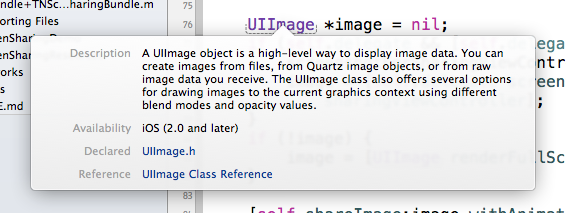
帮助信息会包括,一些简单的描述、哪个iOS操作系统开始提供,头文件,参考文档。头文件和参考文档是可以直接点击的。
即使你点击的关键字不是Cocoa库的内容,是自己代码里面的类或者方法,也可以获得相关的定义信息。如下图:
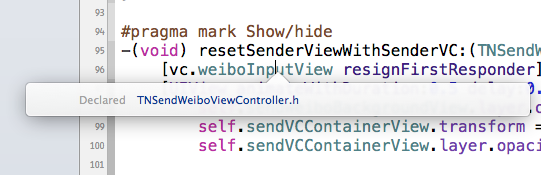
与之相关的热键是Command键加鼠标点击,即可跳到任何一个类名或者方法名的所定义的头文件。
快速查询帮助的另外一个方法是直接打开Quick Help栏,如下图,首先找到“右侧栏开关”,然后找到“Quick Help”开关即可打开。
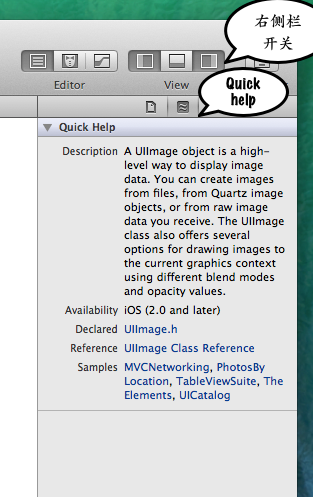
Quick Help栏的作用机制是,只要它在打开状态,只要输入光标在什么关键字上,Quick Help栏就会显示跟关键字相关的简要帮助信息,跟Option键加点击的信息基本一致,但可能略微丰富一点。
写代码的时候,在大多数情况下,查询下快速帮助,看看头文件,就足以了。
搜索帮助 文档阅读界面最左面的上端的放大镜按钮就是搜索界面。下图是我们搜索uiimage,得到的搜索结果。
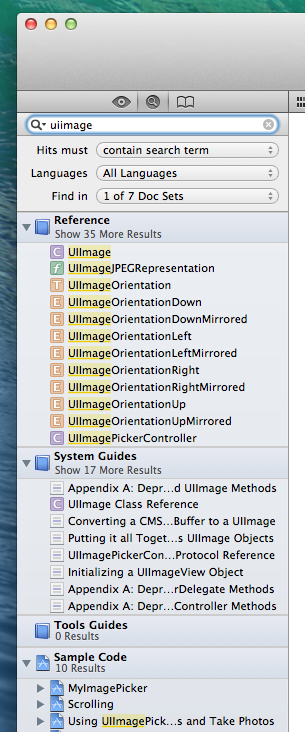
首先值得注意的是,结果也是分类的,分为Reference、System Guides、Tools Guides、Sample Code这四类。类别很利于我们快速找到我们需要的信息。前面已经介绍过类别,跟那个基本一致,参照即可。
另外需要注意的是,搜索框下面的选项,首先是Hits Must(什么样的结果才会命中),包含了三项:
contain search term 这是最常见的就是结果包含搜索词 start with search term 由搜索词开始 match search term 必须完全匹配搜索词 然后是Languages(语言选项),包含Javascript、C++、Java、Objective-C、C语言。
然后是,Find in(在哪些文档库搜索),包含了你Xcode里面安装的全部文档库。
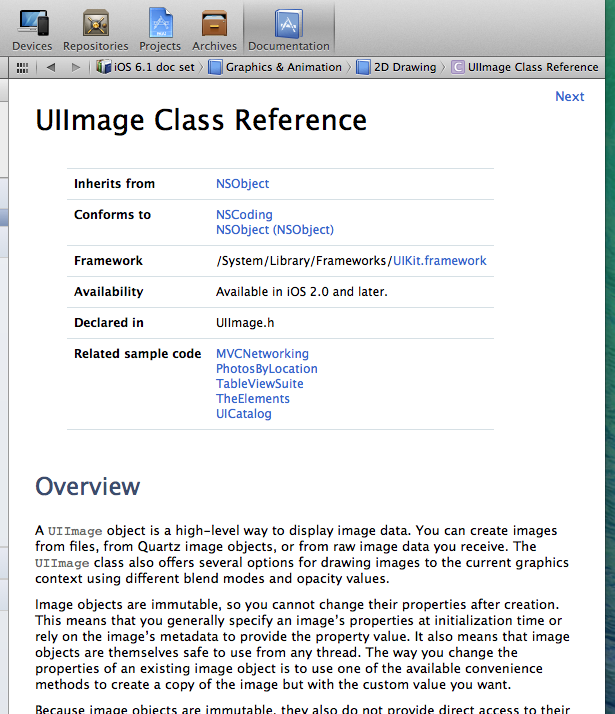
阅读文档 最后,我们简单介绍下怎么阅读文档。文档的阅读界面如下图:
【转】苹果 Xcode 文档阅读指南
一直想写这么一个东西,长期以来我发现很多初学者的问题在于不掌握学习的方法,所以,Xcode那么好的文档摆在那里,对他们也起不到什么太大的作用。从论坛、微博等等地方看到的初学者提出的问题,也暴露出他们不知道很多他们的疑惑其实在文档里面写的非常清楚。而有时候当他们想从文档去找解决方案的时候,也往往找不到。或者有些人意识到了,阅读文档是学习的好办法,但是不得要领。
中国的技术社区有一个很没意思的毛病,就是技术深了,看不懂骂不知所云,技术浅了,看得懂骂没有技术含量。不过管那么孙子做啥,对于现在可能还不知道怎么阅读文档的人,希望这篇文章有所教益吧。
#Xcode文档的结构#
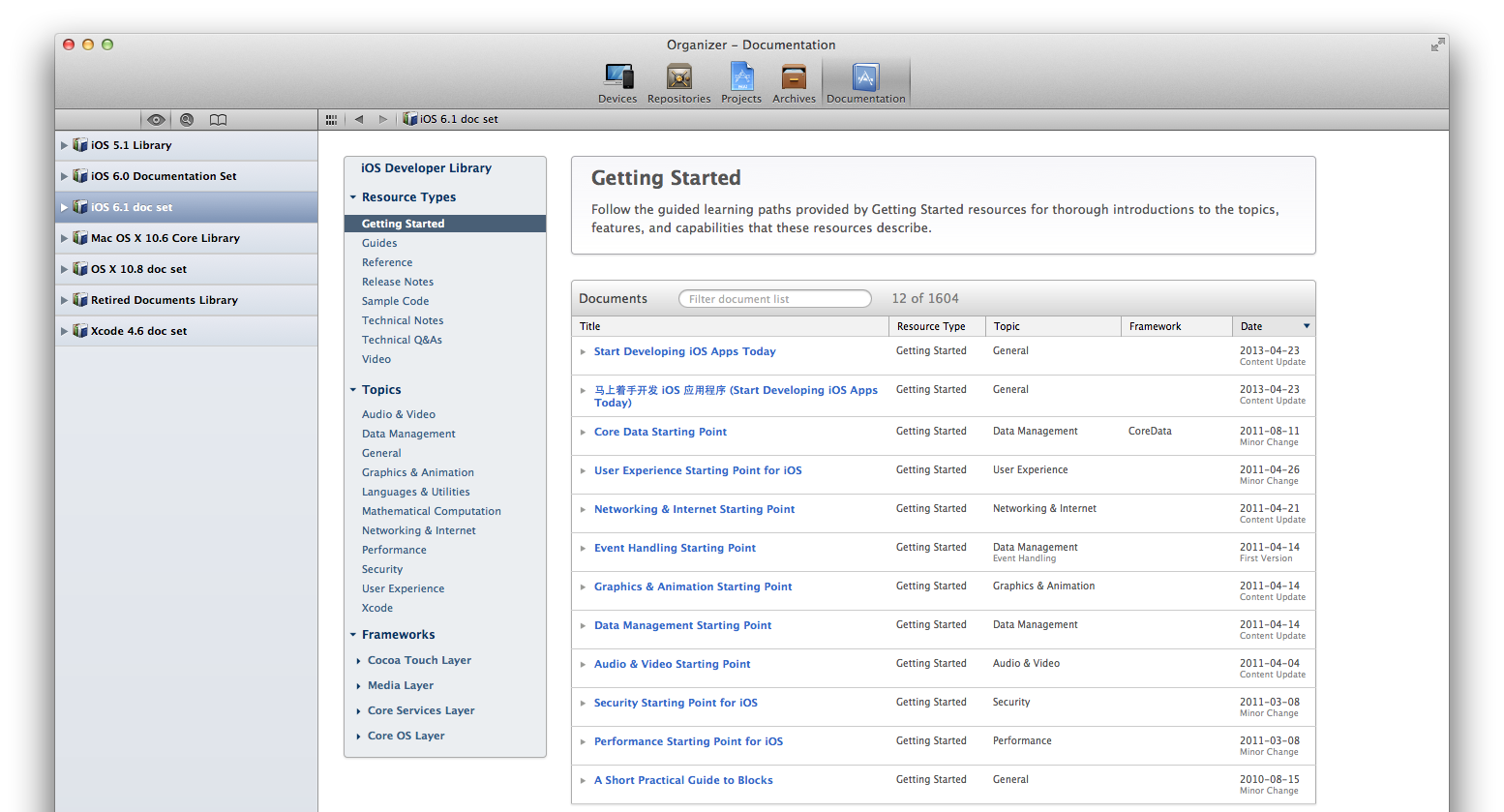
如上图,整个文档界面有左面的侧栏和右面的内容区域构成。左面的侧栏可以选择不同的文档库。你的Xcode里面一般来说有一组不同版本的iOS文档库、一组不同版本的OS X文档库,以及一个Xcode文档库。
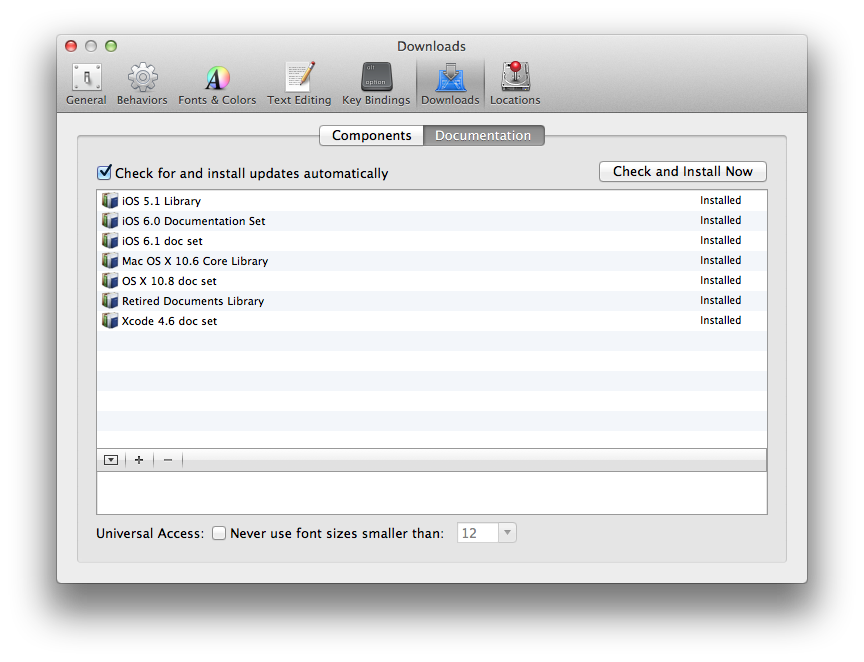
如果你这里没有你要查看的文档库,你可以选择Xcode的Preferences菜单,然后选择Downloads -> Documentation。在这里可以看到已经下载安装了的文档库,还没有下载的文档库,可以酌情选择。如下图:
然后我们看,文档内容区域的左侧导航区域,这里揭示了文档库的结构。如下图:
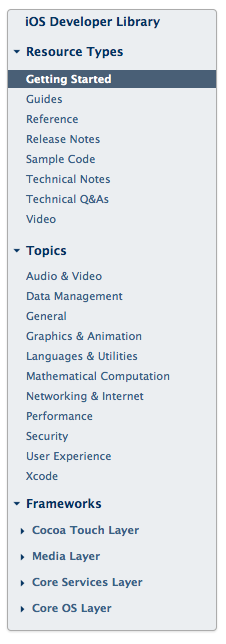
首先是,Resource Types,也就是资源类型。文档库里面全部的文档都是这几个类型中的一个:
iOS 开发那些事
将自己从零开始开发iOS应用所遇到的各种使用帮助记录在这里,以供后期查看和分享给其他同事####
Xcode使用帮助
- show line numbers
- 打开xcode开发工具
- 点击屏幕菜单栏Xcode,然后点击Preference,选择Text Editing
- 默认选中Editing,第一行就是show : Line numbers,勾选中即可。
iOS单元测试OCUnit使用帮助
- 通过xcode创建的包含Unit Test的项目是使用的OCUnit单元测试 OCUnitProjectTests.h代码如下:
#import <SenTestingKit/SenTestingKit.h>
 @interface OCUnitProjectTests : SenTestCase
 @end
【转】NodeJS工具搭建博客
早之前就听说了Hexo, 也就是Octopress的node.js版本, 不过是源自台湾. setup的话其实中文英文都无妨吧. 尽管阅读起来肯定是较之中文困难, 不过也基本习惯了.
基本上按照官方给出的guide很容易搭建好. 不过还是不准备现在就撤出Octopress奔赴Hexo, 尽管基于node.js的Hexo在generate, deploy的时候有一定的执行速度优势, 不过目前post不太多, so有感觉出差距, 但不大.
因为不熟node, 还是遇上了麻烦, root下的db.json就不太明白. 导致在修改tags的时候死活修改不了, 查了一下github上以前的issue才知道得把db.json这货rm掉. 否则不管怎么generate, 怎么deploy都只会有增无减.
另一个跟Octopress比较不同的是Markdown的解析器. Octopress用的是Liquid, 而Hexo用的是Marked. 大部分情况下都没什么差别. 而之所以发现这个不同是因为刚开始的generate的时候不断报错